Browser-Based Virtual Office: Run Your Remote Team With Zero Installs
In this article

Most remote teams drift apart because the tools meant to keep them together quietly add friction, not because people stop caring. Another app to download. Another login. Another meeting to schedule before anyone can actually talk. By the time you've installed the client, updated it, granted permissions, and found the right link, the spark of "hey, can I ask you something real quick?" has already faded.
That gap between wanting to be near your teammates and being able to is exactly where a browser-based virtual office earns its place. Instead of stacking yet another heavy desktop application onto already crowded machines, it lives where your team already spends the day: the browser. You open a tab, and you're in the office. Your avatar is there. Your teammates are there. You can see who's around, walk over, and start working side-by-side. No install, no scheduling, no "let me send you the link."
This article walks through what a virtual office actually is, why the "just open a tab" model is the real adoption unlock, and how the pieces fit together, from real-time presence to instant meetings to AI that works in the flow. If you've been searching for virtual office software for remote teams that people will actually use, this is the model worth understanding.
The adoption problem with heavy remote tools
Here's the uncomfortable truth about most remote-work software: the hardest part isn't the feature list. It's getting an entire team to adopt it and keep using it after week two.
Think about what a typical "rich" collaboration tool asks of a new team member on day one. Download an installer. Wait for it to finish. Restart the app because the first launch glitched. Sign in. Verify your email. Grant microphone, camera, and screen-recording permissions in your operating system's settings. Then wait for the next forced update a few days later. Multiply that by every person on the team, every new hire, every contractor who joins for two weeks, and every personal laptop that's locked down by IT.
Each of those steps is a small wall. Individually they're survivable. Stacked together, they're why so many tools end up "officially adopted" but practically abandoned, opened once during onboarding and never again.
There's a second, quieter problem: heavy tools tend to be destination tools. You go to them on purpose, for a reason, usually a scheduled event. That's the opposite of how an office works. In a physical office, presence is ambient. You don't schedule a meeting to ask a colleague where a file lives. You just turn your chair. When the only way to reach someone is a calendar invite or a typed-out message that interrupts them, the casual, low-stakes interactions that build trust and momentum simply stop happening.
A browser-based virtual office attacks both problems at once. It removes the install wall completely, and it replaces "destination" with "presence." That combination is the difference between a tool your team tolerates and a place your team actually lives in.
What a virtual office actually is
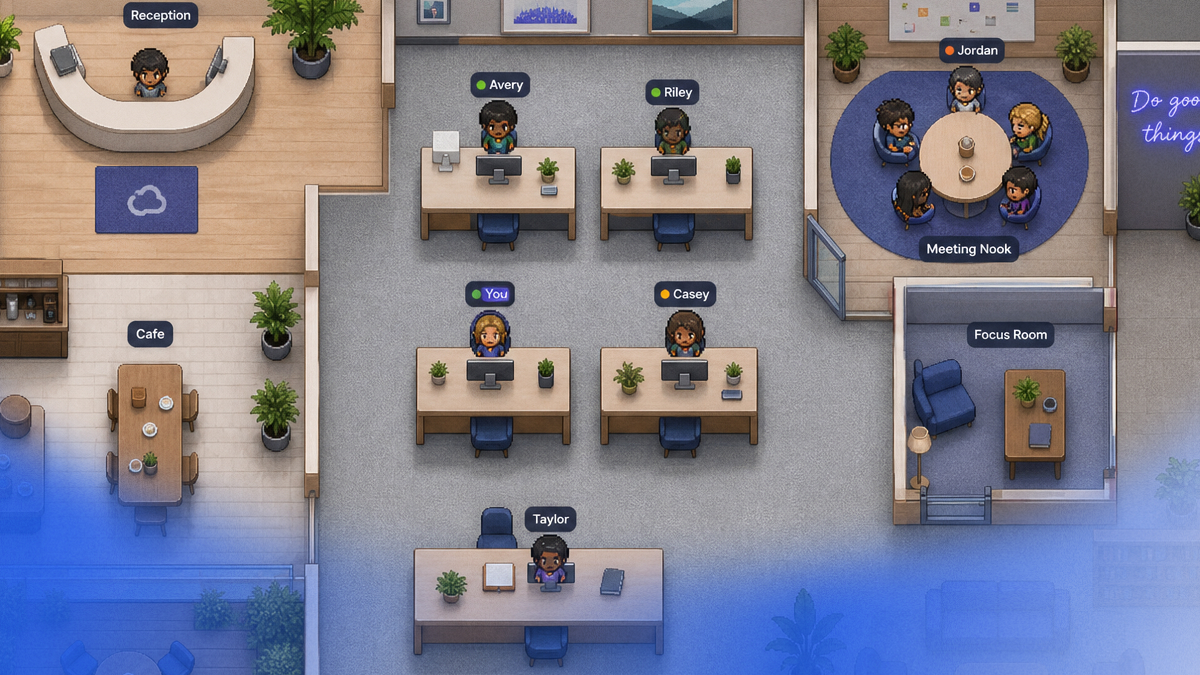
A virtual office is a shared, persistent space where your remote team works together in real time, represented by avatars on a map you can see and move around. It's less like a video-call app and more like a digital version of the building your team would share if everyone were in the same city.
The key word is persistent. It doesn't blink into existence when a meeting starts and disappear when it ends. It's always there. When you start your day, you "arrive" at the office. Your teammates can see you've arrived. You can glance at the map and immediately understand the shape of the day: who's heads-down, who's free, who's clustered together working on something.
Three things make a virtual office feel like a real one:
- Spatial presence. Everyone has an avatar with a position. Proximity means something. Walking your avatar toward someone is a natural, low-pressure way to signal "I'd like to talk."
- Continuity. The space carries over from yesterday to today. The meeting room is still there. Your desk is still your desk. That continuity is what makes it feel like a home base rather than a series of disconnected sessions.
- Ambient awareness. You can sense the room without interrogating it. You don't have to ask "is anyone around?" You can see it.
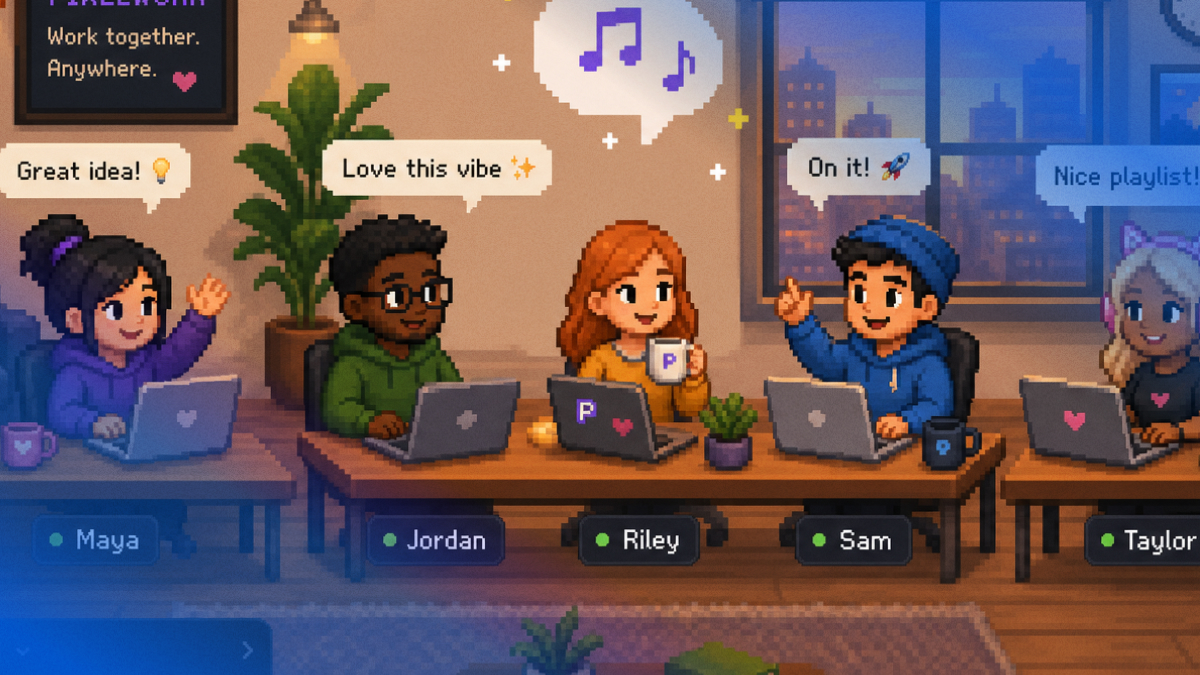
With Hurbly, this all happens inside the browser. The office is a customizable map, your avatar moves and interacts, and the whole experience is built around the idea captured in the tagline: your remote team, working side-by-side. Not separate silos that occasionally sync, but genuinely alongside each other.
Why "no install, just open a tab" is the adoption unlock
Let's be direct about why running entirely in the browser matters so much. It's not a technical footnote. It's the single biggest reason a tool either spreads through a team or stalls.
When something runs in the browser, the distance between "I heard about this" and "I'm using it" collapses to almost nothing. There's no download. No admin password. No compatibility check against your operating system version. No corporate-device lockdown blocking the installer. You click a link, and within roughly 30 seconds you're standing in the office.
That speed changes adoption math entirely. Consider the moments where heavy tools lose people:
- The new hire on day one. Instead of spending their first hour wrestling with installers, they open a tab and they're already in the room with the team. Belonging starts on minute one, not day three.
- The contractor or freelancer. You don't want to ask a short-term collaborator to install a permanent desktop client. A link they can open instantly is exactly right.
- The locked-down work laptop. Plenty of people can't install arbitrary software on company machines. The browser is almost always allowed. No-install means no IT ticket.
- The "just hop in" moment. Someone says "come look at this for a second." With an install-first tool, that's a non-starter. With a browser tab, they're there before the sentence finishes.
Zero install also means zero maintenance for your team. There's no version drift where half the company is on an old build. There's nothing to update, nothing to reinstall after a laptop gets wiped, nothing to troubleshoot when an OS update breaks the client. You open the tab, and you're always on the current version.
This is the quiet superpower of a browser-based virtual office: it lowers the cost of being present to nearly zero. When the cost of showing up drops, people show up. That's the whole thing in remote work.
The three pillars, explained
Hurbly is built on three pillars that, together, recreate the things a good physical office gives you naturally. None of them require an install, and all of them live in the same tab.
Pillar one: Virtual Office (the map)
This is the heart of it. The Virtual Office is a customizable map where your team's avatars live, move, and interact. You can shape it to fit how your team actually works: desks for focused work, an open area for casual conversation, dedicated rooms for projects or teams, a lounge for downtime.
Because it's spatial, the map does something a list of names can never do. It gives you a sense of the room. You can see clusters forming. You can see who's settled at their desk and who's drifted over to chat. Moving your avatar somewhere is a meaningful, intuitive action, the digital equivalent of pulling up a chair.
The map isn't decoration. It's the interface for presence and proximity, and everything else builds on top of it.
Pillar two: Instant Meetings
This is where a virtual office leaves the calendar-and-link model behind. To start a conversation, you don't schedule anything and you don't send a link. You walk your avatar to a desk (or to a teammate, or into a room) and the meeting just happens.
That's the whole flow. Proximity opens the conversation. It mirrors the most natural interaction in any physical workplace: you walk over, you talk. No "are you free at 2:30?" No link pasted into chat. No waiting-room limbo.
The effect on a team is real. The friction that normally suppresses quick syncs disappears, so quick syncs actually happen. Questions get answered in thirty seconds instead of sitting in a message queue for an hour. Spontaneous problem-solving comes back. Meetings become something you do rather than something you book.
Pillar three: Team Chat
Not everything needs a face-to-face moment, and a virtual office knows that. Team Chat lives right alongside the map for the messages, links, quick updates, and threads that are better written than spoken.
The point is that chat sits inside the office rather than in a separate destination app. You're not toggling between "the place I talk" and "the place I work." Presence, voice, and text all share one environment, so you can read a message, glance up to see the person is right there, and walk over if it's easier to just say it.
How real-time presence works
Presence is the feature that turns a map into an office. In Hurbly, presence is real-time and human-readable, and it answers the question every remote worker silently asks all day: who's actually around right now?
Each person carries a clear status:
- Available. I'm here and open to a quick chat or an instant meeting. Walk over.
- Busy. I'm heads-down. Please don't pull me into something right now.
Those two states do a surprising amount of work. "Available" makes spontaneous collaboration safe. You know you're not interrupting, because the green light is literally on. "Busy" protects deep work without anyone having to feel rude. In a physical office, you read this from body language and closed doors. In a virtual office, the status line makes it explicit and reliable.
Combine status with position on the map and you get ambient awareness that feels remarkably close to a real room. You can see that three people are clustered in the project room. You can see that a teammate just arrived and is marked available. You can see that the person you need is busy, so you'll drop them a chat message instead of barging in.
This is the difference between knowing your team is technically online somewhere and genuinely being in the same space. Real-time presence is what makes "side-by-side" true rather than aspirational.
Customizable maps and avatars
A virtual office should feel like your office, not a generic template. The way you get there is customization on two levels: the space and the people.
Customizable maps. You shape the office to match how your team operates. A small startup might want one open room where everyone can see everyone. A larger team might carve out areas per squad, a quiet zone for focus work, a meeting room, and a casual lounge. As your team grows or your rituals change, the map can change with it. The layout becomes a soft expression of your culture: where collaboration happens, where focus is protected, where people relax.
Customizable avatars. Each person gets an avatar they can make their own. It might sound like a small thing, but identity matters for belonging. Seeing a teammate's recognizable avatar move across the map is a tiny, repeated signal that there's a real human there, not just a name in a sidebar. Personalization turns abstract "users" into your people, the ones you'd wave to across the room.
Together, custom maps and avatars are what give a virtual office warmth. It stops being software and starts being a place that feels like yours.
AI agents in the flow
Plenty of tools have bolted AI on as a separate panel you have to remember to go visit. Hurbly's approach is different: the AI works in the flow, inside the office, where the work is already happening. There are three agents, each with a clear job.
Assistant
The Assistant helps with the day-to-day substance of work: files, brainstorming, and support. Need to find or organize a document? Want a thinking partner to riff on ideas before a sync? Stuck and need a hand? The Assistant is right there in the environment, not in a separate tool you have to context-switch into. It's help that meets you where you already are.
Music
The Music agent runs a shared queue, so the office can have a shared soundtrack the way a real room sometimes does. It's a small touch with an outsized effect on atmosphere. A shared playlist is one of those casual, human things that makes a space feel alive and collective rather than sterile and individual. It's the digital version of someone putting on music everyone enjoys.
Transcript
The Transcript agent records meetings, produces summaries, and captures key decisions. Because instant meetings happen so easily in a virtual office, you want a way to make sure nothing important evaporates when the conversation ends. Transcript handles that quietly in the background: the spontaneous desk chat that turned into an important decision still leaves a clear, searchable record. No one has to volunteer to be the note-taker, and people who weren't there can catch up on what was decided and why.
The thread connecting all three is the same: AI that lives inside the workflow, not in a separate destination. You get real functionality (transcripts, idea support, file help, shared music) without leaving the light, browser-based environment you're already in.
Security and privacy controls
A space that's always-on and presence-first has to take privacy seriously, because "always present" should never mean "always exposed." Hurbly builds privacy into the everyday controls of the office rather than burying it in settings.
The most important one is the everyday status itself: Busy mode. When you mark yourself busy, you're signaling that you're in deep work and shouldn't be pulled into a spontaneous meeting. It's a personal "do not disturb" that the whole team can see and respect, the closed-door equivalent in a virtual space. It protects focus without requiring you to disappear entirely.
Beyond status, room controls let you manage who's in a space and how conversations happen. Not every conversation should be open to the whole office. Sensitive discussions, one-on-ones, or a focused project huddle can take place in a controlled room rather than in the open. The office gives you the flexibility to be visible and collaborative by default while still having private spaces when you need them.
The principle is simple: presence should be a choice you control, not a state you're trapped in. Available when you want to be reachable, busy when you need to protect your time, and private rooms when a conversation calls for it.
How to get your team started in 30 seconds
The whole point of being browser-based is that getting started is genuinely fast, not "fast" with a footnote. Here's how it actually goes:
- Open the tab. No download, no installer, no admin password. You open Hurbly in your browser the same way you'd open any website.
- Set up your avatar and step into the office. Pick how you look, and you're standing on the map. Within roughly 30 seconds, you're in.
- Invite your team with a link. Each teammate clicks and is in the office just as fast, on any machine, including locked-down work laptops.
- Start working side-by-side. Walk over to a teammate for an instant meeting. Drop a message in Team Chat. Mark yourself available or busy. Let the AI agents handle transcripts, files, and the shared playlist while you work.
Because there's nothing to install or maintain, there's no rollout project, no IT ticket queue, no version-mismatch troubleshooting. You can have a real, functioning office before a typical kickoff meeting would have even loaded. It comes with a 30-day free trial, so the team can genuinely live in it before deciding, which is the only honest way to evaluate a presence tool. You don't judge an office from a demo. You judge it from a week of actually working there.
Who it's for
A browser-based virtual office scales with you, which is part of why it fits so many situations.
- From two people up. Hurbly works whether you're a two-person founding team that wants to feel like you're sitting next to each other, or a larger remote org that needs structured rooms and clear presence. Small teams get instant intimacy. Larger teams get a sense of place and the ability to find each other.
- Fully remote teams that miss the casual, ambient closeness of a shared office and want it back without forcing anyone to relocate.
- Hybrid and distributed teams where some people are remote and the in-office crowd shouldn't have all the spontaneous hallway conversations to themselves.
- Teams that lean on contractors and freelancers, where a no-install, link-to-join model means short-term collaborators can be genuinely present without a setup burden.
- Any team frustrated by the "schedule a call to ask a quick question" tax, who want their quick syncs back.
If your team's day is currently a patchwork of "is anyone around?" messages and calendar invites for conversations that should take ninety seconds, a virtual office is built for you.
How Hurbly compares to the tools you already use
It helps to be clear about where a virtual office sits next to the tools you probably already have, because it isn't trying to replace all of them. It's filling the gap between them.
- Slack (and other chat tools) are great at chat. They're the asynchronous text layer. But chat alone can't give you presence or the feeling of being in the same room.
- Zoom (and other meeting tools) are great at scheduled meetings. You book a time, you join a call, you leave. That's exactly right for planned, formal conversations, but it's a destination, not a place you live.
- Hurbly is the office. It's the continuous presence layer that the other two don't provide. It's where you are during the day, the always-on space where chat, spontaneous meetings, and ambient awareness coexist.
Put simply: chat is your messages, scheduled meetings are your appointments, and the virtual office is the building you all share in between. The first two are about specific moments. The office is about being together continuously.
Frequently asked questions
Do I really not have to install anything?
Correct. Hurbly is 100% browser-based. There's no desktop app to download, no installer to run, and no admin permissions to grant. You open a tab and you're in the office, typically within about 30 seconds. That's also why it works on locked-down work machines where you can't install software.
How are meetings different from a normal video call?
There's no scheduling and no link to send. To start a meeting, you walk your avatar to a desk or over to a teammate, and the conversation begins from proximity. It's the digital version of walking over to someone's desk, which means quick syncs actually happen instead of waiting in a calendar.
Can people tell when I don't want to be interrupted?
Yes. You can set your status to busy, which signals to the whole team that you're in deep work and shouldn't be pulled into a spontaneous meeting. Combined with room controls and private rooms, you stay in control of when you're reachable and when you're protected.
Does it replace Slack and Zoom?
It complements them by filling the gap they leave. Chat tools handle asynchronous messages and meeting tools handle scheduled calls, but neither gives you continuous presence. Hurbly is the office, the always-on space where you can see who's around and work side-by-side. Many teams keep their existing chat and meeting habits and use the virtual office as their home base.
What can the AI agents actually do?
Three things, all inside the office. The Assistant helps with files, brainstorming, and support. Music runs a shared queue so the office can have a soundtrack. Transcript records meetings and produces summaries and key decisions, so spontaneous conversations still leave a clear record.
How small a team can use it?
It works from two people up. A two-person team gets the feeling of sitting right next to each other, and larger teams get structured rooms, clear presence, and an easy way to find one another across the map.
Is there a way to try it before committing?
Yes, there's a 30-day free trial. Because it's browser-based, there's nothing to install to get started, so you and your whole team can genuinely work in the office for a few weeks before deciding.
Bringing your team into the same room again
Remote work doesn't have to mean working alone, near each other. The reason teams drift apart isn't a lack of effort. It's a stack of tools that turn presence into a chore and conversation into a calendar event. A browser-based virtual office removes that friction at the root: no install, instant presence, meetings that start by walking over, and AI that helps in the flow instead of in a separate tab.
That's what Hurbly is built to give you: a real office your team can step into in about 30 seconds, see who's around, and work side-by-side, all from a browser tab. Available when you want to connect, busy when you need to focus, together either way.
Your remote team, working side-by-side. Open the tab and feel the difference.
Start free trial and bring your team into the same room, in about 30 seconds, with nothing to install.