How to Fight Remote Work Isolation: 9 Strategies That Actually Work
In this article

You log in. You knock out your tasks. You close your laptop. And somewhere around 4 p.m., you realize you haven't actually talked to another human all day, not really. A few Slack threads. A status update. Maybe a thumbs-up emoji on someone's PR. But no one walked past your desk to ask how your weekend was. No one caught your eye across the room. The quiet that felt like freedom in week one starts to feel like something else by month six.
If that sounds familiar, you're not broken and you're not doing remote work "wrong." You're experiencing one of the most common and least talked-about costs of distributed work: isolation. Loneliness at work isn't an inevitable side effect of working from home. It's a design problem. And design problems can be solved.
This guide breaks down how to fight remote work isolation with nine concrete, repeatable strategies, the kind you can actually start using this week. We'll also look at why the problem is so persistent (spoiler: it's not because you don't have enough productivity tools), what isolation quietly costs your team, and where an always-on virtual office fits into the picture.
Why Remote Work Feels Lonely (Even When You Love It)
Most people who go remote do it on purpose. They wanted the flexibility, the saved commute, the deep-focus mornings without someone tapping their shoulder. So the loneliness sneaks up on them, because it's not supposed to be there. You chose this. Why does it ache a little?
Here's the honest answer. The office was never only about work. It was a place where connection happened by accident. You bumped into a teammate at the coffee machine and ended up solving a problem in two minutes that would've taken three email threads. You overheard a conversation and chimed in with exactly the context someone needed. You read the room when a project was going sideways, not from a status report, but from faces and body language and the energy of the space.
Remote work, as most of us currently do it, strips out almost all of that. What's left is the explicit, scheduled, on-purpose communication: the meeting on the calendar, the message you decided to send, the document you remembered to share. Everything has to be intentional. And intentional connection is exhausting to sustain, because the moment you get busy or shy or overwhelmed, it's the first thing to drop.
That gap between "I'm technically connected to everyone all the time" and "I feel completely alone" has a name in our heads even if we never say it out loud. It's the connection gap: the distance between being reachable and being present. You can be in twelve channels and on three calls and still feel like a ghost passing through your own workday.
The deeper truth is that humans are wired for presence, the low-grade, ambient awareness that other people are around. Not interacting with you every second, just there. That ambient sense of company is what most remote setups accidentally delete, and it's exactly what we'll spend the rest of this article rebuilding.
The Real Cost of Isolation (It's Bigger Than a Bad Mood)
It's tempting to file loneliness under "soft stuff," something to feel a little guilty about but ultimately push past. That's a mistake. Isolation has hard, measurable consequences for individuals and for the teams they belong to.
It quietly erodes morale
Morale isn't built in all-hands meetings. It's built in the dozens of tiny, warm moments that tell you I belong here, and these people have my back. When those moments disappear, what's left is the work itself, and work alone is rarely enough to keep someone emotionally invested. People don't burn out only from too many tasks. They burn out from doing those tasks while feeling like no one would notice if they vanished.
It drives good people out the door
When someone feels disconnected from their team, the psychological cost of leaving drops fast. There's no relationship pulling them to stay, no Tuesday-afternoon banter they'd miss, no sense of being part of something. A job becomes "just a job," and just-a-job is the easiest thing in the world to replace with a slightly better offer. Retention is, in large part, a connection problem wearing a compensation costume.
It strangles creativity and problem-solving
Some of the best ideas in any company's history came from collisions: two people from different teams, an offhand comment, a "wait, say that again." Isolation eliminates collisions. When every interaction has to be scheduled and justified, people stop reaching out for the half-formed thought, the "this is probably nothing, but..." And those half-formed thoughts are where innovation lives. A team that only communicates with purpose slowly loses the ability to be surprised by itself.
It makes everything feel harder than it is
Disconnected people ask for help later, share blockers slower, and carry stress longer. A two-minute question becomes a two-day spiral because reaching out feels like an imposition rather than a natural part of being on a team. Multiply that across a whole organization and you get a workforce that's working hard but moving slow, not from lack of skill, but from lack of the social ease that makes collaboration easy.
None of this shows up cleanly in a dashboard, which is exactly why it's so dangerous. By the time isolation shows up in your attrition numbers, it's been quietly compounding for months.
Why Async Tools Alone Don't Fix Loneliness
Here's where a lot of well-meaning teams go wrong. They feel the disconnection, they want to fix it, and they reach for more tools. More channels. A better wiki. A fancier project board. Async-everything, documented-everything, "we don't need meetings, we have a beautifully organized Notion."
And to be clear: async tools are genuinely great. They respect focus time, they create a record, they let people in different time zones contribute without burning out. The async movement got a lot right, and we're not here to argue against it.
But async tools solve a coordination problem, not a connection problem. They make sure the work flows. They do almost nothing for the feeling of working alongside other humans.
Think about it. A perfectly written async update tells you what happened. It doesn't let you feel your coworker's relief when the bug finally got fixed, or share a quick laugh about how ridiculous the bug was. A threaded comment resolves a question. It doesn't replace the ten seconds of "ugh, Mondays, right?" that makes you feel like a person instead of a ticket-processing machine.
Loneliness is fundamentally about the absence of presence, and async, by design, removes presence. It says: don't interrupt, don't expect a reply, communicate on your own time. That's wonderful for deep work and terrible for the part of you that just wants to know someone else is in the building.
So the answer isn't to abandon async. It's to stop expecting async to do a job it was never built for, and to deliberately rebuild presence and spontaneity on top of it. That's what the next nine strategies are about.
9 Strategies to Fight Remote Work Isolation
You don't need to do all nine at once. Pick two or three that fit your team, make them real habits, and add more over time. The goal isn't to engineer connection into existence through sheer effort. It's to remove the friction that's currently keeping connection from happening on its own.
1. Build a daily ritual that isn't about work
Rituals are the heartbeat of a connected team. A daily ritual gives everyone a predictable, low-pressure moment to show up as humans, not just as job titles.
This can be dead simple. A morning "good morning" thread where people drop a photo of their coffee, their pet, or the weather outside their window. A two-minute standup that starts with one non-work question ("what's one good thing from your weekend?") before anyone touches a Jira board. An end-of-day "shutting down" wave where people sign off and say what they're looking forward to that evening.
The content barely matters. What matters is the rhythm. When connection has a reliable home on the calendar, people stop having to summon the courage to reach out, because the door is already open every single day. Rituals turn belonging from something you hope happens into something you can count on.
2. Try virtual coworking and body-doubling
One of the strangest and most effective remedies for isolation is also one of the simplest: work next to someone without actually working with them. This is sometimes called body-doubling, and it's the digital version of two people studying in the same library, each on their own thing, but somehow more focused and less alone because the other person is there.
Set up a recurring "coworking" block where teammates hop into a shared space, mics optional, cameras optional, and just work. No agenda. You might exchange a sentence or two, or you might say nothing at all. The point is the ambient company. It recreates that quiet office hum where you can glance up and see other people heads-down on their own tasks.
It sounds almost too basic to work, and that's exactly why people sleep on it. Try it for a week. The difference in how the day feels is hard to overstate.
3. Make presence visible with real-time signals
A huge chunk of office connection came from simply knowing who was around. You knew at a glance that Maria was at her desk, that the design team was in a huddle, that Sam had stepped out for lunch. That ambient awareness made reaching out feel natural, because you weren't shouting into a void, you were talking to someone you could see.
Most remote setups destroy this. A green dot next to a name tells you almost nothing. Is that person deep in flow? Available for a quick chat? In a meeting? About to log off? Without real presence signals, every "got a sec?" is a gamble, and people get tired of gambling.
Give your team a way to broadcast genuine presence: clear available and busy states, an at-a-glance sense of who's around right now, who's heads-down, who's free for a chat. When presence is visible, spontaneous connection stops being a risk and starts being easy. You're not interrupting a stranger in the dark anymore. You're walking up to someone you can see is open to talking.
4. Normalize spontaneous check-ins
In a physical office, you don't schedule a meeting to ask a colleague how they're doing. You just lean over. Remote work, weirdly, makes a five-second "hey, you good?" feel like it requires a calendar invite and an agenda.
Fight this directly by making lightweight, unscheduled check-ins a celebrated part of your culture. Encourage people to ping a teammate just to say hi. Drop into someone's space for thirty seconds. Send a "thinking of you, no reply needed" message. Leaders especially should model this, because when the manager does a casual no-agenda check-in, it gives everyone else permission to do the same.
The key word is spontaneous. The magic of these moments is that they're not productivity-driven. They exist purely to remind people they're seen. A team where spontaneous check-ins are normal is a team where nobody disappears quietly into isolation.
5. Create shared informal spaces
Every great office has its informal territory: the kitchen, the lounge, the corner where people gather after lunch. These spaces aren't on the org chart, but they're where the real culture lives. Remote teams need them too, and they have to be created on purpose because they won't emerge from a task board.
Build dedicated places for the non-work stuff. A space for sharing music and memes. A channel for pet photos and weekend plans. A standing "virtual lunch" anyone can drop into. A book club, a gaming session, a Friday wind-down hangout. The whole point is that these spaces are genuinely optional and genuinely informal. The moment they get co-opted for "let's also discuss the roadmap," they die.
When people have somewhere to just be together, friendships form. And friendships are the strongest possible armor against isolation, far stronger than any policy or perk.
6. Balance async and sync on purpose
We spent a whole section on why async alone isn't enough, so the strategy here is balance, not abandonment. The healthiest remote teams are deliberate about which mode they're in and why.
Use async for what it's brilliant at: status updates, documentation, decisions that need a record, anything that crosses time zones, anything that deserves thoughtful writing instead of a hot take. Protect deep-focus time fiercely and don't let "quick syncs" metastasize across the calendar.
Reserve sync, the real-time, face-to-face or voice kind, for the things that actually need presence: brainstorming, resolving tension, celebrating wins, onboarding someone new, or simply maintaining the human relationships that make all the async work flow smoothly. A good rule of thumb. If it's about information, async is probably fine. If it's about people or energy or trust, lean sync. Getting this balance right is one of the most useful things a remote team can do.
7. Pair new hires with onboarding buddies
There is no lonelier feeling in remote work than being the new person. In an office, a new hire absorbs culture by osmosis, who to ask, how things really work, what the inside jokes are, just by being in the room. Remotely, all of that invisible knowledge is locked away, and a new teammate can spend weeks feeling like an outsider looking in.
An onboarding buddy fixes this. Assign every new hire a dedicated peer (not their manager) whose explicit job is to be their go-to human for the first month or two. The buddy answers the "dumb" questions, makes introductions, decodes the culture, and checks in regularly just to make sure the new person feels welcome.
This single practice can completely change someone's first impression of your team, from "I'm alone and confused" to "I belong here and someone's got my back." And first impressions of belonging tend to stick for years.
8. Share music and culture moments
Connection isn't built only through conversation. It's built through shared experience, the sense that we're all part of something with a flavor and a vibe of its own. Music is one of the most underrated tools for this.
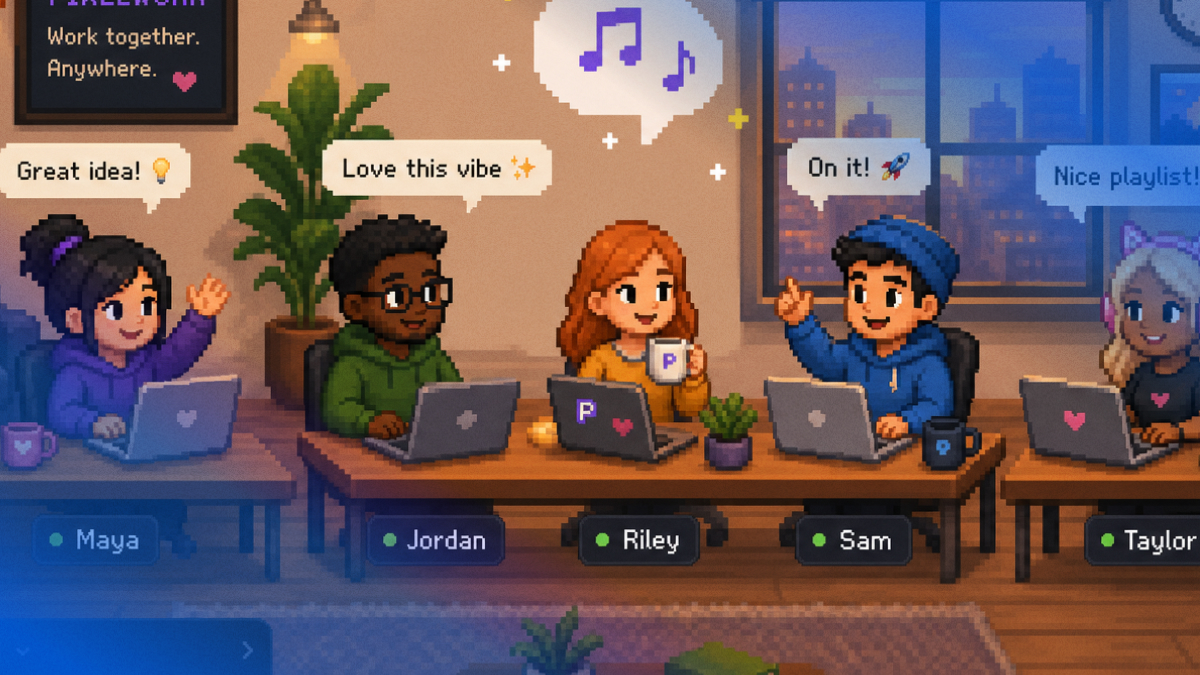
Imagine a shared queue where anyone can add a track, and the whole team hears what's playing during a coworking session. Suddenly there's a soundtrack to the workday, and a tiny window into each other's personalities. Someone's questionable taste in 2000s pop becomes a running joke. A coworker's perfect focus playlist becomes a gift to the whole team. These are the cultural moments that make a group of remote workers feel like an actual community rather than a collection of strangers on a shared payroll.
Look for other shared culture moments too: celebrating wins together in real time, marking birthdays and milestones, building little traditions that are uniquely yours. Culture isn't a values statement on a wall nobody reads. It's the accumulation of small shared moments, and remote teams have to create those moments deliberately.
9. Set up an always-on virtual office
Here's the strategy that ties all the others together: give your team a place. Not a tool they open for a scheduled meeting and then close, but a persistent space where the team simply exists together throughout the day.
This is the missing piece in most remote setups. Channels and calendars are activities, not places. There's no "there" there, nowhere to just be alongside your teammates the way you'd share an office. An always-on virtual office restores that sense of place: a shared environment where people show up, see each other, and move through the day side-by-side, even when they're scattered across cities and time zones.
When the office is always there in the background, presence stops being something you schedule and becomes the default. You're not alone in your apartment staring at a list of tasks. You're in the room with your team. And that changes everything about how the workday feels.
Where a Virtual Office Fits: Recreating the "Walk Over to a Desk" Moment
Let's get concrete about what an always-on virtual office actually looks like in practice, because this is where strategies one through eight stop being separate tactics and start being a single, natural way of working.
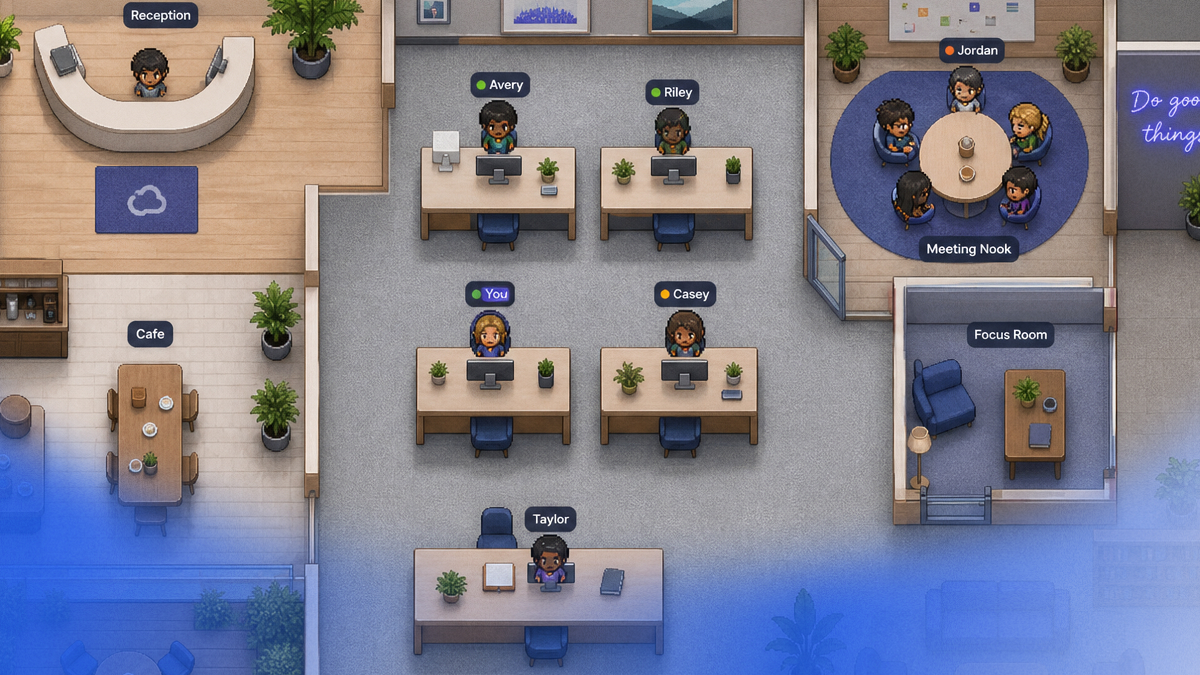
A browser-native virtual office recreates the physical office online. There's a customizable map, and everyone has an avatar (a real photo or a character) that moves around the space. You can see where people are. You can see who's heads-down at their desk and who's hanging out in the lounge. Presence isn't a green dot anymore. It's a living, visible thing, exactly the ambient awareness that strategy three is all about.
And here's the part that brings spontaneity back to life. When you have a quick question for a colleague, you don't schedule a meeting and you don't fire off a message into the async void hoping they'll see it. You walk your avatar over to their desk and talk. That's it. The conversation happens in the moment, the way it would if you shared a floor. No calendar Tetris, no "got a sec?" anxiety, no waiting four hours for a reply. Instant meetings happen because the people are right there, and getting to them is as simple as moving across the room.
This is the difference between presence and mere reachability. In a virtual office, the spontaneous check-ins from strategy four happen naturally, because the friction is gone. The coworking and body-doubling from strategy two are the default state, because you're already sharing the space. The informal areas from strategy five are built into the map: a lounge, a kitchen, a hangout corner. And it all runs in the browser, with no install, so the "place" is always one click away.
The AI agents make it richer still, woven into the flow rather than bolted on as a separate product. An Assistant Agent helps with file sharing, brainstorming, and real-time support right where you're working. A Music Agent runs the shared queue that powers your culture moments from strategy eight. And a Transcript Agent quietly records meetings and delivers transcripts, summaries, and key decisions, so the sync conversations from strategy six don't vanish into the air. They get captured and turned into the async record your team relies on. That's the async-plus-sync balance working in harmony instead of in tension.
This isn't about replacing your existing tools with something heavier or more complicated. Some virtual-office tools are powerful but feel like a lot to run. The goal is the opposite: a light, browser-based space that simply gives your team back the thing remote work took away, the feeling of being in the room together, working side-by-side.
Frequently Asked Questions
Is remote work isolation really that common?
Yes, and it tends to be underreported because people feel awkward admitting it. Many remote workers genuinely love the flexibility and feel lonely at the same time, and those two things can coexist. The isolation usually isn't dramatic. It's a slow, ambient sense of disconnection that builds over months. If you've felt it, you're in very good company.
Can't we just schedule more video calls to fix this?
More scheduled calls usually make things worse, not better. Wall-to-wall meetings cause fatigue and eat the focus time that drew people to remote work in the first place. Isolation isn't solved by more communication. It's solved by more natural communication, presence and spontaneity rather than another invite on the calendar. The aim is to make connection effortless, not to add more obligations.
How is a virtual office different from Zoom or Google Meet?
Tools like Zoom and Meet are excellent for scheduled, intentional meetings. You decide to talk, you send an invite, you join a call. A virtual office is about presence between meetings: a persistent place where your team exists side-by-side all day, where you can see who's around and walk your avatar over to a colleague's desk for an instant, unscheduled chat. It's less "join this call at 3 p.m." and more "we're all in the office together, drop by anytime."
Will an always-on virtual office feel like surveillance?
It shouldn't, and the design matters here. Healthy presence is about ambient awareness and easy availability, not monitoring. Clear available and busy signals let people protect their focus time and step away whenever they need to, the same way you'd close your office door or grab lunch. The goal is to recreate the comfort of sharing a space, not to track anyone. Presence is something people opt into to feel connected, not something done to them.
How do I get my team to actually use these strategies?
Start small and lead by example. Pick one or two strategies (a daily non-work ritual and a coworking block are great first choices) and have leaders participate visibly. Don't mandate connection. Make it easy and inviting, then let it grow. Culture shifts when the path of least resistance becomes the connected one, which is exactly why a low-friction, browser-based virtual office helps: when the room is always one click away, showing up together becomes the natural default.
How long until we feel less isolated?
Faster than you'd think for the daily feeling, slower for the deep relationships. A coworking session or a shared music queue can make a single workday feel noticeably warmer right away. The real, durable sense of belonging, the kind that lifts retention and creativity, builds over weeks and months of consistent small moments. The strategies here are designed to compound: each connected day makes the next one easier.
Bringing It All Together
Remote work isolation is real, it's costly, and it's quietly affecting more people than anyone admits at the standup. But it is not a price you have to pay for the freedom of working from anywhere. The loneliness comes from a missing layer, the ambient presence and easy spontaneity that the physical office gave us by accident, and that layer can be deliberately rebuilt.
You don't fix it by adding more tools or scheduling more meetings. You fix it by giving your team rituals, visible presence, room for spontaneous connection, informal spaces to just be human together, a healthy async-sync balance, real support for new hires, shared culture moments, and above all, a place to exist side-by-side throughout the day.
That last piece is where a browser-native virtual office turns nine separate strategies into one natural way of working. When you can see your teammates, share a soundtrack, and walk over to someone's desk for a two-minute chat, the connection gap closes, not because everyone's trying harder, but because the friction that kept people apart is finally gone. Your remote team, working side-by-side, the way it was always supposed to feel.
Ready to give your team a place to be together again? Start your free trial and bring presence, spontaneity, and a little more humanity back to your remote workday.