Enhancing Remote Collaboration with a Virtual Meeting Room
In this article

Enhancing Remote Collaboration with a Virtual Meeting Room
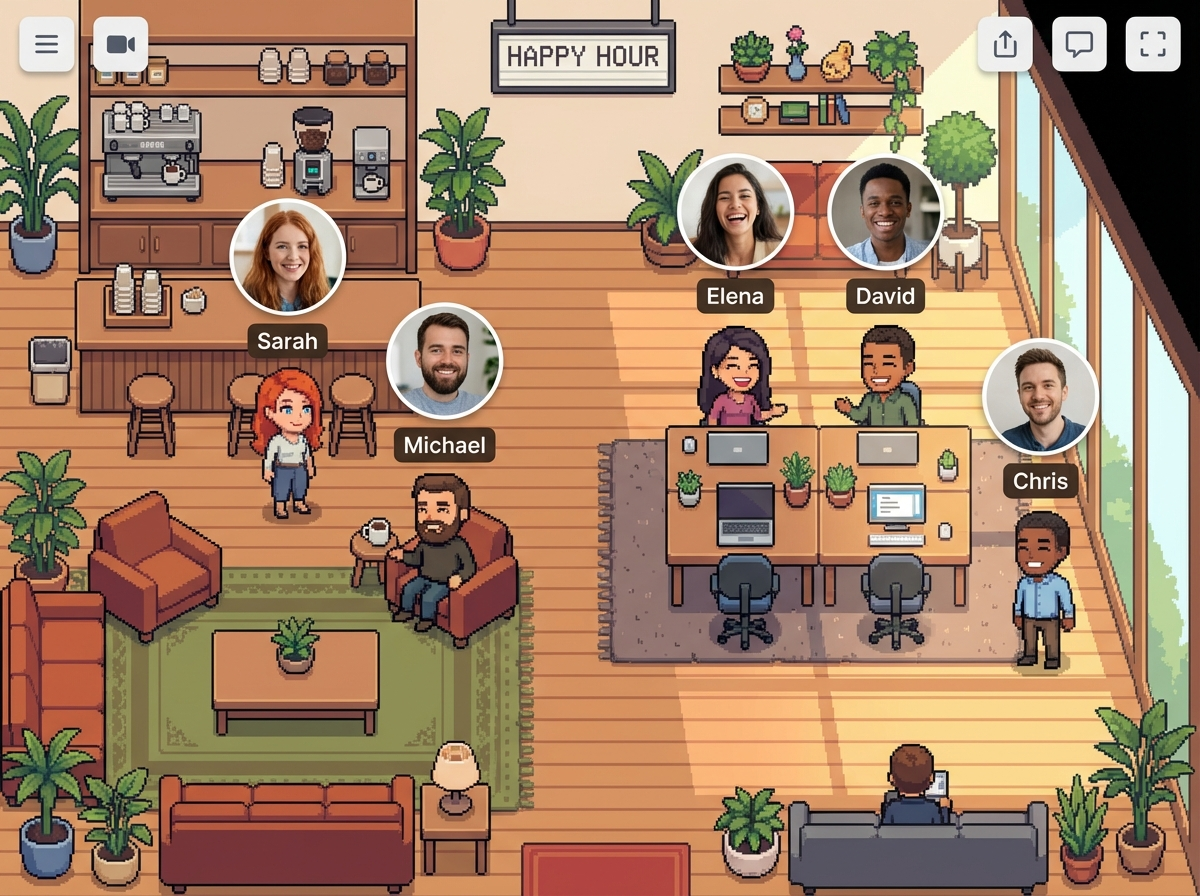
A virtual meeting room serves as a digital space where remote teams gather to communicate, share ideas, and collaborate on projects in real time. Unlike traditional video conferencing that requires pre-scheduled links, a modern virtual meeting room allows for spontaneous interaction, mimicking the natural flow of a physical office. By integrating presence indicators, these spaces help team members identify who is available for a quick chat or who is currently occupied with deep work.
The primary function of a virtual meeting room is to bridge the geographical gap between distributed employees. In 2026, the reliance on static messaging has decreased in favor of dynamic environments where a virtual meeting room can be accessed instantly. This shift reduces the "meeting fatigue" often associated with formal scheduling, as it encourages shorter, more frequent touchpoints that resolve issues faster than long email threads or delayed chat responses.
Core Features of an Effective Virtual Meeting Room
To maximize productivity, a virtual meeting room must provide more than just a video feed. High-quality platforms focus on spatial awareness and real-time status updates. For instance, Hurbly.ai enhances this experience by showing exactly who is active within the virtual meeting room, allowing colleagues to join conversations without the friction of sending invite codes. This transparency ensures that the digital workspace remains organized and accessible.
Key components of a robust virtual meeting room include:
- Real-time presence indicators (Available, Focused, In a Meeting).
- Instant audio and video capabilities for rapid decision-making.
- Screen sharing and collaborative document editing within the same interface.
- Spatial audio features that simulate being in the same physical location.
When a team utilizes a dedicated virtual meeting room, they create a centralized hub for all internal communications. This setup prevents information silos and ensures that every team member, regardless of their time zone, has a clear view of the collective workflow. The virtual meeting room becomes the default destination for brainstorming sessions, daily stand-ups, and casual social interactions.
Comparing Communication Methods in 2026
The evolution of remote work has led to various ways of connecting. The following table compares traditional methods with the use of a modern virtual meeting room to highlight efficiency gains in professional environments.
| Feature | Traditional Video Calls | Virtual Meeting Room |
|---|---|---|
| Accessibility | Requires links and passwords | Instant entry via dashboard |
| Spontaneity | Low (needs scheduling) | High (click-to-talk) |
| Visibility | Hidden until the call starts | Real-time presence tracking |
| Context | Limited to the specific invite | Continuous team awareness |
| User Flow | Disruptive notifications | Natural office-like transitions |
By choosing a virtual meeting room over standard conferencing tools, organizations foster a culture of openness. Employees no longer feel isolated, as the virtual meeting room provides a visual representation of their colleagues' activities. This constant connection helps maintain team morale and ensures that urgent questions are addressed in a timely manner within the virtual meeting room environment.
Implementing a Virtual Meeting Room for Distributed Teams
Transitioning to a virtual meeting room requires a shift in how teams perceive digital availability. Instead of hiding behind "Do Not Disturb" statuses, users are encouraged to use the virtual meeting room to signal their current capacity for collaboration. This method allows managers to see the pulse of the team without micromanaging, as the virtual meeting room reflects active engagement levels automatically.
To successfully integrate a virtual meeting room into your daily operations, follow these steps:
- Define clear protocols for when to use the virtual meeting room versus asynchronous chat.
- Encourage "open door" hours where senior staff stay active in a specific virtual meeting room for mentorship.
- Utilize platforms like Hurbly.ai to visualize the office layout and improve the sense of belonging.
- Regularly review the effectiveness of the virtual meeting room to ensure it meets the evolving needs of the project.
The ultimate goal of a virtual meeting room is to remove the barriers to communication. When every employee knows they can enter a virtual meeting room to find a colleague, the speed of innovation increases. This fluid interaction model is essential for competitive businesses in 2026 that rely on the agility and synchronization provided by a well-managed virtual meeting room.

